Web SDK Customization
Customization
To make the capture experience closer to your visual identity, you can customize some components in the Instruction and Camera screens.
Instruction Screen
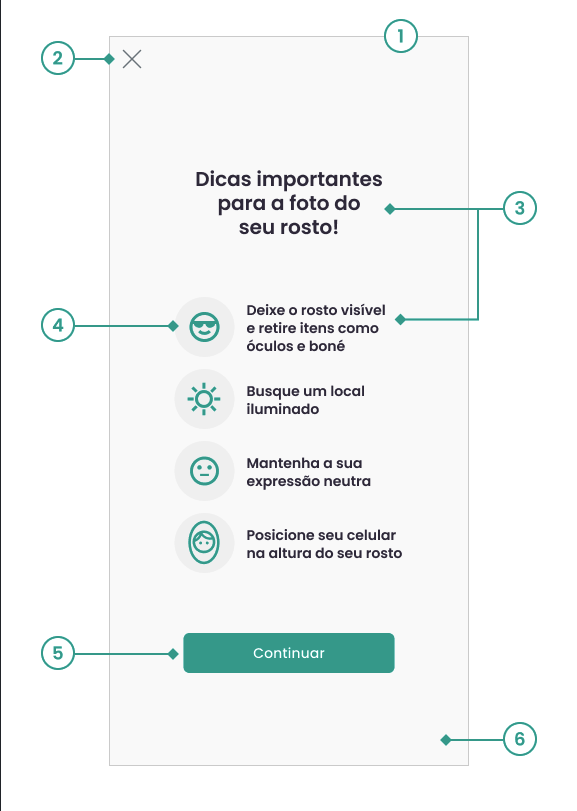
- JavaScript
1 - Screen
a. Toggle visibility
IFortfaceInstructions.showInstructions: boolean (default: True)
2 - Back Button (X)
a. Icon image
IFortfaceInstructions.cancelButtonImage: string
b. Toggle visibility
IFortfaceInstructions.showCancelButton: boolean (default: True)
3 - Text (title and items)
a. Font
IFortfaceInstructions.font: string (default: 'Poppins, sans-serif')
b. Colors
IFortfaceInstructions.titleTextColor: string (default: '#332D41')
IFortfaceInstructions.bodyTextColor: string (default: '#332D41')
c. Textos
IFortfaceInstructions.title: string (default: 'Dicas importantes para a foto do seu rosto!')
IFortfaceInstructions.noItemsMessage: string (default: 'Deixe o rosto visível e retire itens como óculos e boné')
IFortfaceInstructions.placeMessage: string (default: 'Busque um local iluminado')
IFortfaceInstructions.expressionMessage: string (default: 'Mantenha a sua expressão neutra')
IFortfaceInstructions.positionMessage: string (default: 'Posicione seu celular na altura do seu rosto')\
4 - Icons
a. Icon color
IFortfaceInstructions.iconColor: string (default: '#00A594')
IFortfaceInstructions.backgroundIconColor: string (default: '#f1f1f1')
5 - Continue Button
a. Button color
IFortfaceInstructions.buttonBgColor: string (default: '#00A594')
IFortfaceInstructions.buttonPressedColor: string (default: '#008577')
b. Text color
IFortfaceInstructions.buttonTextColor: string (default: '#FFFFFF')
IFortfaceInstructions.buttonText: string (default: 'Continuar')
c. Rounded corners
IFortfaceInstructions.buttonRadius: string (default: '6px')
6 - Screen background
a. Background color
IFortfaceInstructions.background: string (default: '#FFFFFF')
Camera Screen - Biometric Capture
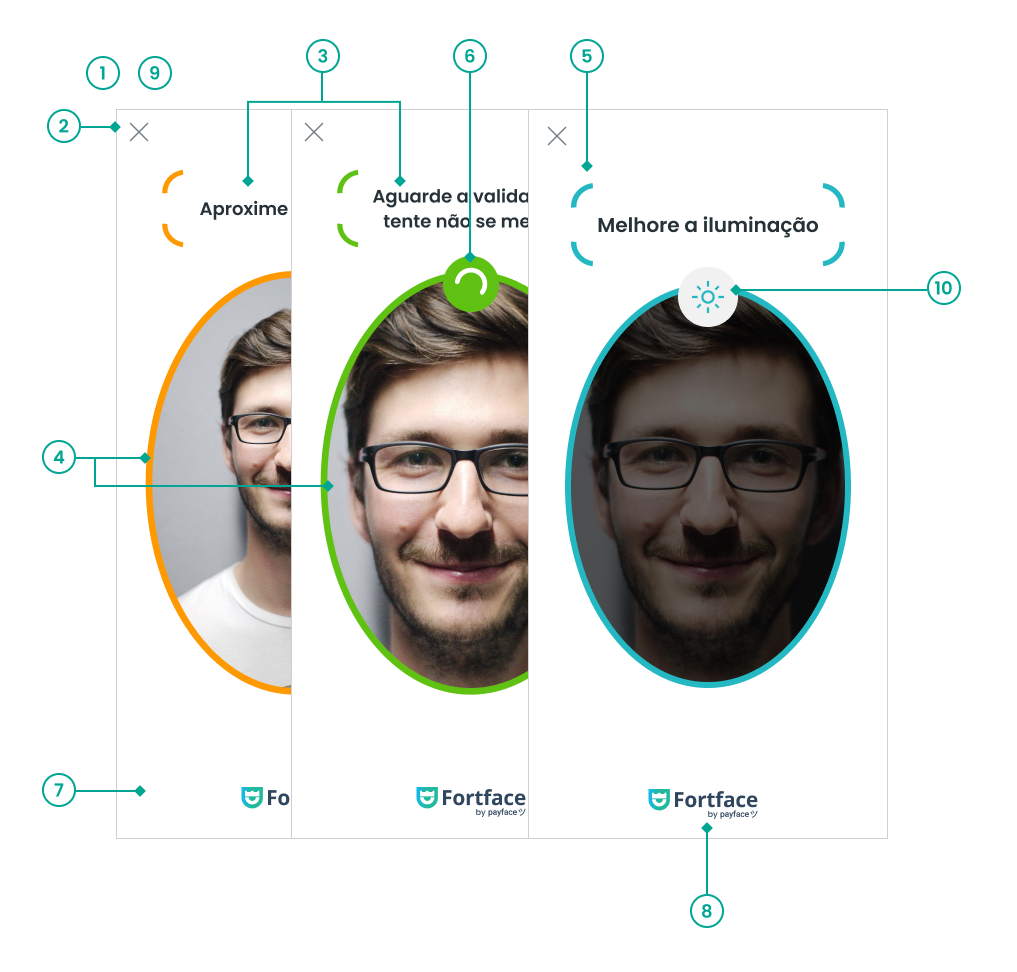
- JavaScript
1 - Timeout
a. Time
IFortfaceCamera.timeout: number (default: 30)
IFortfaceCamera.brightnessEvaluation.validationTimeout: number (default: 10)
2 - Back Button (X)
a. Icon image
IFortfaceCamera.cancelButtonImage: string
b. Toggle visibility
IFortfaceCamera.showCancelButton: boolean (default: True)
3 - Feedback messages
a. Font
IFortfaceCamera.font: string (default: 'Poppins, sans-serif')
b. Messages
IFortfaceCamera.startMessage: string (default: 'Enquadre o seu rosto dentro da forma oval') IFortfaceCamera.faceNoCenter: string (default: 'Centralize seu rosto') IFortfaceCamera.noFaceRoll: string (default: 'Deixe sua cabeça reta')
IFortfaceCamera.facePositioned: string (default: 'Aguarde a validação,\ntente não se mexer')
IFortfaceCamera.noFace: string (default: 'Posicione seu rosto na área indicada')
IFortfaceCamera.faceFar: string (default: 'Aproxime o seu rosto')
IFortfaceCamera.faceNear: string (default: 'Afaste o seu rosto')
IFortfaceCamera.facePitchIsUp: string (default: 'Abaixe seu rosto')
IFortfaceCamera.facePitchIsDown: string (default: 'Levante seu rosto')
IFortfaceCamera.noFaceYaw: string (default: 'Olhe para frente')
IFortfaceCamera.faceRollLeft: string (default: 'Incline sua cabeça para a esquerda')
IFortfaceCamera.faceRollRight: string (default: 'Incline sua cabeça para a direita')
IFortfaceCamera.faceCenterLeft: string (default: 'Mova a câmera para a esquerda')
IFortfaceCamera.faceCenterRight: string (default: 'Mova a câmera para a direita')
IFortfaceCamera.faceCenterUp: string (default: 'Mova a câmera para cima')
IFortfaceCamera.faceCenterDown: string (default: 'Mova a câmera para baixo')
IFortfaceCamera.brightnessEvaluation.lowBrightnessMessage: string (default: 'Melhore a iluminação')
IFortfaceCamera.brightnessEvaluation.highBrightnessMessage: string (default: 'Diminua a luz no\nseu rosto')
c. Color
IFortfaceCamera.textColor: string (default: '#332D41')
4 - Status
a. Neutral
IFortfaceCamera.neutralColor: string (default: '#CDCDCD')
b. Warning
IFortfaceCamera.alertColor: string (default: '#FF9902')
c. Success
IFortfaceCamera.successColor: string (default: '#5FC213')
d. Luminosity
IFortfaceCamera.brightnessEvaluation.feedbackColor: string (default: '#24B8C2')
5-Message frames
a.Visibility on/off
IFortfaceCamera.frameTextVisible: boolean (default: True)
6 - Success status loading
a. Colors
IFortfaceCamera.loadingColor: string (default: '#5FC213')
IFortfaceCamera.loadingStroke: string (default: '#FFFFFF')
7 - Screen background
a. Color
IFortfaceCamera.background: string (default: '#FFFFFF')
8 - Footer logo
a. Image
IFortfaceCamera.logo: string
9 - Modal Mode
a. Enable modal mode
IFortfaceModal.available: boolean (default: False)
b. Background
IFortfaceModal.overlayColor: string (default: '#000000')
IFortfaceModal.overlayOpacity: number (default: 0.4)
c. Minimum screen width to enable modal mode
IFortfaceModal.minScreenWidth: number (default: 1024)
10 - Luminosity icon
a. Image
IFortfaceCamera.brightnessEvaluation.highBrightnessIcon: string
IFortfaceCamera.brightnessEvaluation.lowBrightnessIcon: string
b. Color
IFortfaceCamera.brightnessEvaluation.iconBackgroundColor: string (default: '#F1F1F1')
Ready State
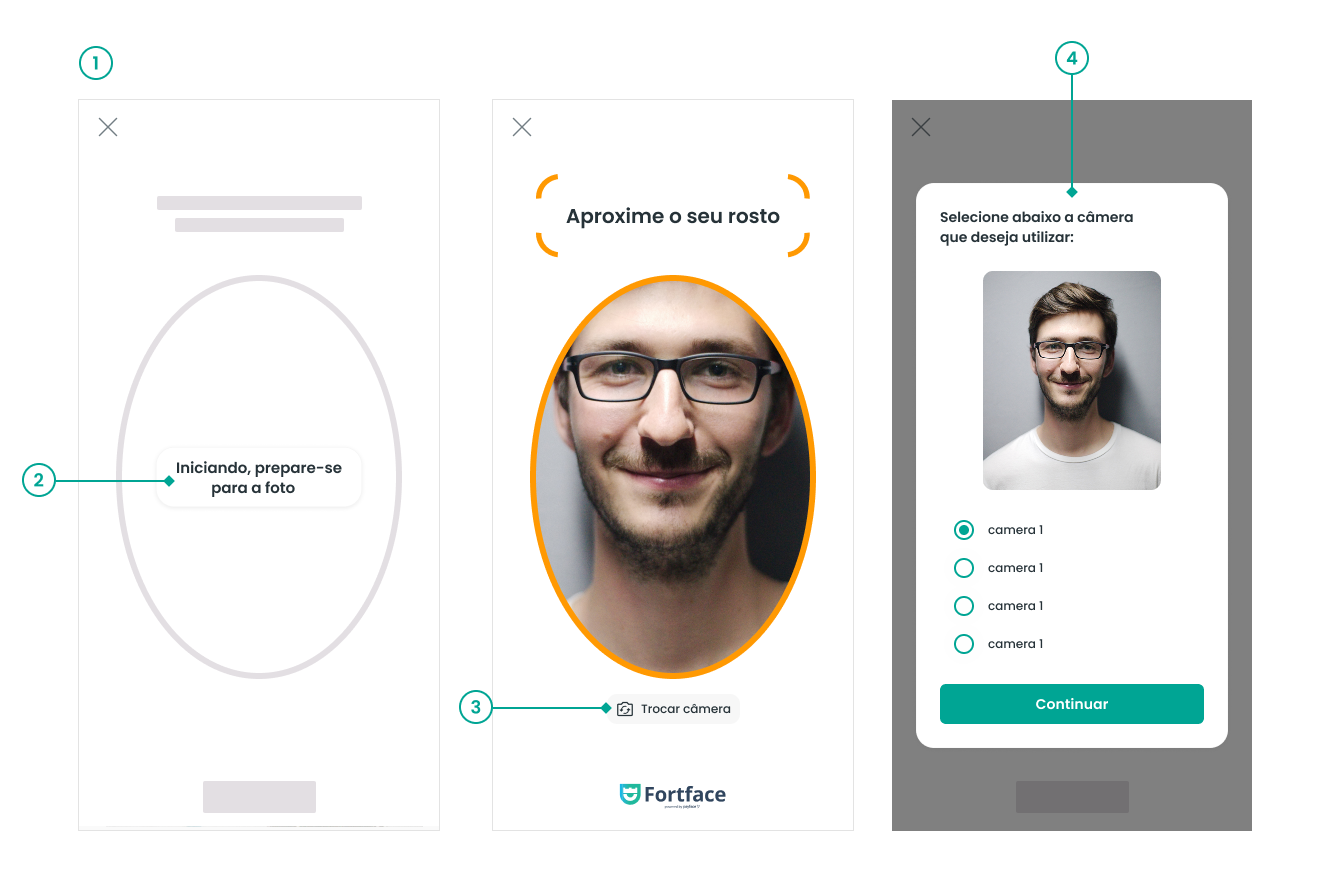
- JavaScript
1 - Timeout
a. Time
IFortfaceBase.timeout: number (default: 15)
2 - Camera initialization messages
a. Message sequence
The array should be filled with 3 strings, where indices 0, 1, and 2 represent the order of messages that will appear on the screen.
IFortfaceCamera.waitCameraDescription: string[] (default: ['Iniciando, prepare-se para a foto', 'Aguarde só mais um pouco', 'Quase lá'])
3 - Camera switch button
a. Button activation
IFortfaceCamera.switchCameraButtonVisible: boolean (default: False)
b. Button color
IFortfaceCamera.changeCameraButtonBgColor: string (default: '#F7F7F7')
c. Text color
IFortfaceCamera.changeCameraButtonTextColor: string (default: '#000000')
d. Rounded corners
IFortfaceCamera.changeCameraButtonRadius: string (default: '7px')
4 - Camera selector component
a. Camera selector activation
IFortfaceCameraPreview.showPreviewModalIfError: boolean (default: True)
b. Title
IFortfaceCameraPreview.title: string (default: 'Selecione abaixo a câmera que deseja utilizar')
c. Background
IFortfaceCameraPreview.background: string (default: '#FFFFFF')
d. Selector
IFortfaceCameraPreview.radioColor: string (default: '#00A594')
e. Confirm button
IFortfaceCameraPreview.buttonBgColor: string (default: '#00A594')
IFortfaceCameraPreview.buttonRadius: string (default: '6px')
IFortfaceCameraPreview.buttonTextColor: string (default: '#FFFFFF')
IFortfaceCameraPreview.buttonPressedColor: string (default: '#008577')
Camera Screen - Document Capture
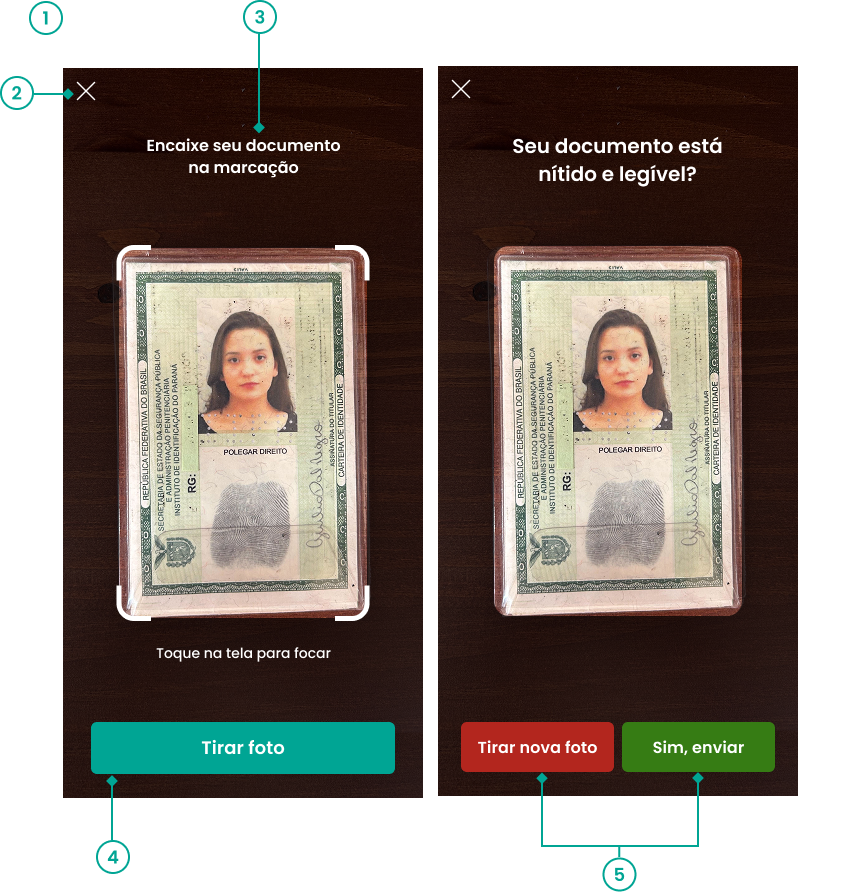
- JavaScript
1 - Maximum timeout
IFortfaceCameraDoc.timeout: number (default: 30)
2 - Back button (X)
a. Icon image
IFortfaceCameraDoc.cancelButtonImage: string
b. Toggle visibility
IFortfaceCameraDoc.showCancelButton: boolean (default: True)
3 - Text
a. Font
IFortfaceCameraDoc.fontFamily: string (default: 'Poppins, sans-serif')
b. Messages
IFortfaceCameraDoc.startMessage: string (default: 'Enquadre o seu documento\nna marcação')
IFortfaceCameraDoc.captureReviewMessage: string (default: 'Seu documento está\nnítido e legível?')
4 - Capture button
a. Text color
IFortfaceCameraDoc.captureDocButtonTextColor: string (default: '#FFFFFF')\
b. Background color
IFortfaceCameraDoc.captureDocButtonColor: string (default: '#00A594') IFortfaceCameraDoc.captureDocButtonPressedColor: string (default: '#008577')
c. Message
IFortfaceCameraDoc.captureDocButtonMessage: string (default: 'Tirar foto');
5 - Confirmation buttons
a. Text color
IFortfaceCameraDoc.retryCaptureButtonTextColor: string (default: '#FFFFFF')
IFortfaceCameraDoc.sendCaptureButtonTextColor: string (default: '#FFFFFF')\
b. Background color
IFortfaceCameraDoc.retryCaptureButtonColor: string (default: '#B3261E')
IFortfaceCameraDoc.retryCaptureButtonPressedColor: string (default: '#7D1B15')
IFortfaceCameraDoc.sendCaptureButtonColor: string (default: '#367C14')
IFortfaceCameraDoc.sendCaptureButtonPressedColor: string (default: '#26570E')
c. Messages
IFortfaceCameraDoc.retryCaptureButtonMessage: string (default: 'Tirar nova foto')
IFortfaceCameraDoc.sendCaptureButtonMessage: string (default: 'Sim, enviar')
Document Upload
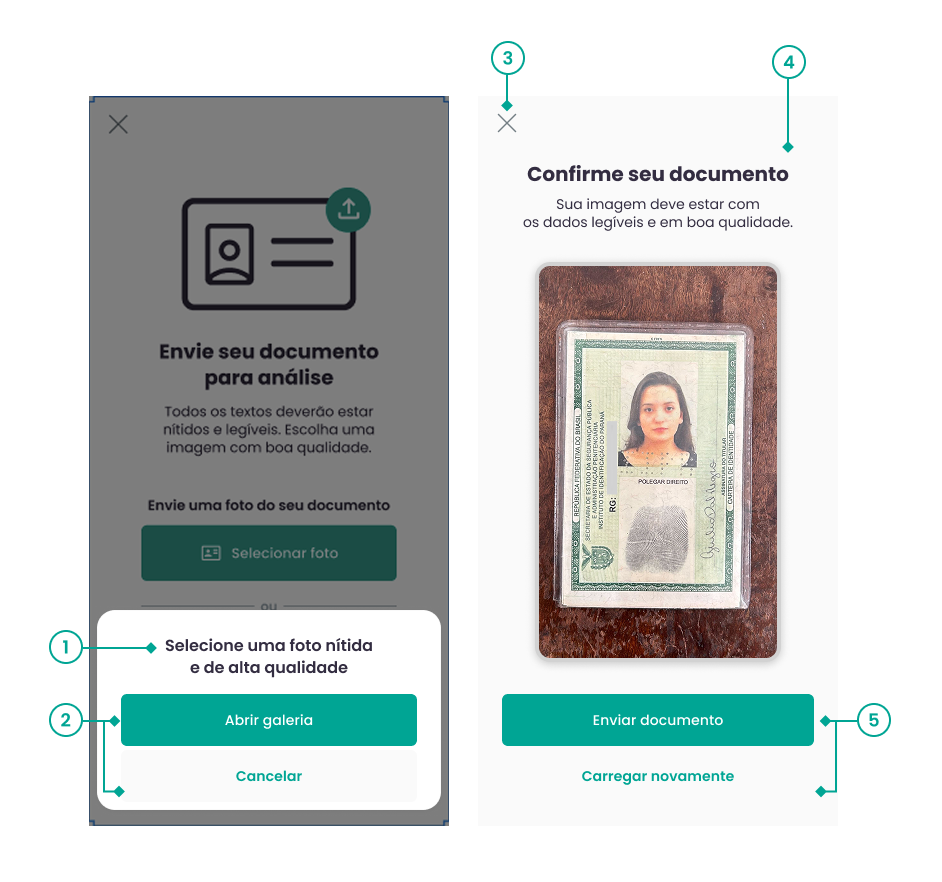
- JavaScript
Bottom Sheet
1 - Title
a. Font and color
IFortfaceDocUpload.initialBottomSheet.fontFamily: string (default: 'Poppins, sans-serif')
IFortfaceDocUpload.initialBottomSheet.textColor: string (default: '#332D41')
b. Message
IFortfaceDocUpload.initialBottomSheet.titleMessage: string (default: 'Selecione uma foto nítida\ne de alta qualidade')
2 - Buttons
a. Background
IFortfaceDocUpload.initialBottomSheet.openGalleryButtonBg: string (default: '#00A594')
IFortfaceDocUpload.initialBottomSheet.openGalleryButtonPressedColor: string (default: '#007468')
b. Text
IFortfaceDocUpload.initialBottomSheet.openGalleryButtonMessage: string (default: 'Abrir galeria')
IFortfaceDocUpload.initialBottomSheet.openGalleryButtonTextColor: string (default: '#FFFFFF')
c. Cancel button text
IFortfaceDocUpload.initialBottomSheet.cancelButtonMessage: string (default: 'Cancelar')
Review Screen
3 - Cancel button (X)
a. Icon image
IFortfaceDocUpload.reviewScreen.cancelButtonImage: string
b. Toggle visibility
IFortfaceDocUpload.reviewScreen.showCancelButton: boolean (default: True)
4 - Text
a. Font and color
IFortfaceDocUpload.reviewScreen.fontFamily: string (default: 'Poppins, sans-serif')
IFortfaceDocUpload.reviewScreen.textColor: string (default: '#332D41')
b. Messages
IFortfaceDocUpload.reviewScreen.titleMessage: string (default: 'Confirme seu documento')
IFortfaceDocUpload.reviewScreen.descriptionMessage: string (default: 'Sua imagem deve estar com\nos dados legíveis e em boa qualidade.')
IFortfaceDocUpload.pdfPreviewUnavailable.titleMessage: string (default: 'Confirme seu arquivo')
IFortfaceDocUpload.pdfPreviewUnavailable.descriptionMessage: string (default: 'Verifique o nome do arquivo\nantes de enviar.')
Some browsers or operating systems may not support the display of PDFs. In this case, the file confirmation screen is modified to display the messages of IFortfaceDocUpload.pdfPreviewUnavailable, and only the file name/size is displayed below the message.
5 - Confirmation and retry buttons
a. Confirmation
IFortfaceDocUpload.reviewScreen.confirmButtonMessage: string (default: 'Enviar documento')
IFortfaceDocUpload.reviewScreen.confirmButtonColor: string (default: '#00A594')
IFortfaceDocUpload.reviewScreen.confirmButtonTextColor: string (default: '#FFFFFF')
IFortfaceDocUpload.reviewScreen.confirmButtonPressedColor: string (default: '#008577')
b. Retry
IFortfaceDocUpload.reviewScreen.retryButtonMessage: string (default: 'Carregar novamente')
IFortfaceDocUpload.reviewScreen.retryButtonTextColor: string (default: '#00A594')
IFortfaceDocUpload.reviewScreen.retryButtonPressedColor: string (default: '#007468')
How it works?
Each variable has its default value.
- If you assign a new value according to the variable type, the new value will be rendered;
- If no new value is assigned, the default will be rendered.
- In the case of the capture screen logo, if no image is initialized, nothing will appear.
Understanding the code snippet
Our SDK allows complete customization of its interface and behavior through the setCustomizer method. For this, you must provide an object containing custom implementations for each of the SDK's main interfaces, such as base, camera, instructions, modal, and others.
Example usage:
const customizerProps = {
  base: IFortfaceBase,
  camera: IFortfaceCamera,
  instructions: IFortfaceInstructions,
  modal: IFortfaceModal,
  cameraDoc: IFortfaceCameraDoc,
  cameraPreview: IFortfaceCameraPreview,
  docUpload: IFortfaceDocUpload,
};

fortfaceSdk.setCustomizer(customizerProps);
Each property represents a specific part of the aforementioned interfaces, allowing you to adapt styles, texts, or behaviors according to your product's needs.
Note
All specific items such as icons, images, font family, etc., must be imported into your app's Assets folder.
Modal or Fullscreen Mode
In addition to interface customizations, we also offer the option to use our SDK in modal or fullscreen mode. The SDK is displayed in fullscreen mode by default on all supported devices.
Examples
Modal Mode (Portrait and Landscape)
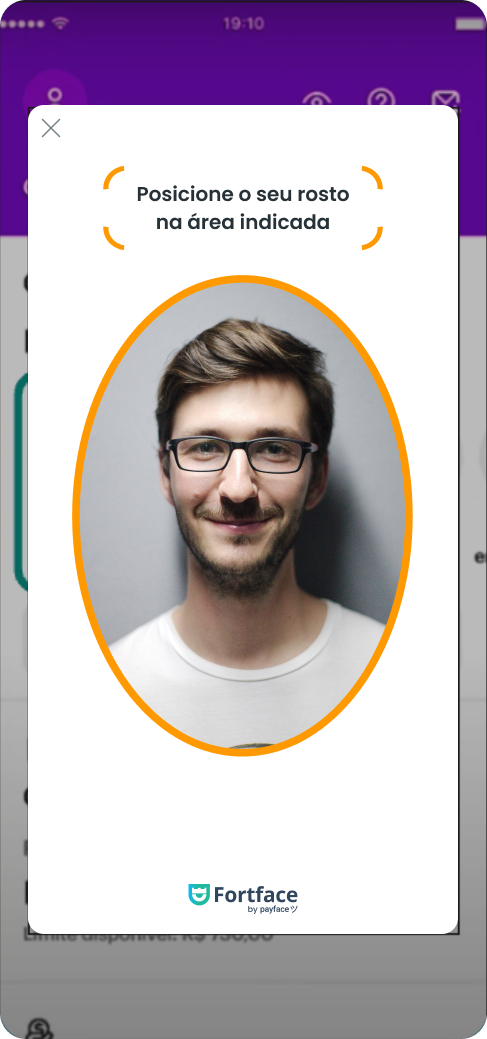
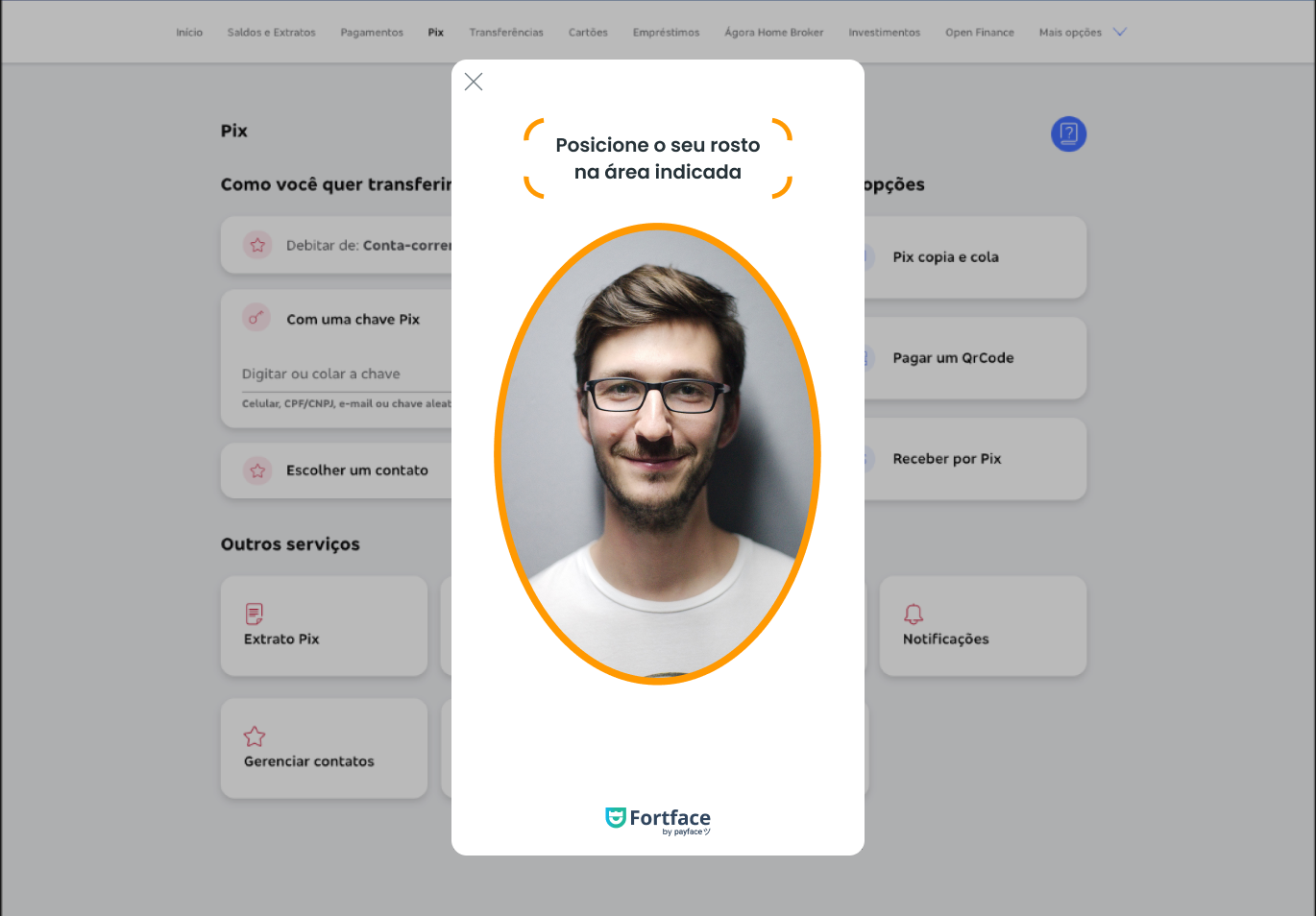
Modo Fullscreen (Portrait e Landscape) - Valor padrão


To configure these modes, you need to change the following attributes: