External Transaction ID
What is the externalTransactionId?
The externalTransactionId is a unique tracking code that we create for each transaction made by a client. Think of it as the protocol number for your request.
The main function of this code is to ensure that all stages and events of the same transaction are grouped together. This allows us to understand the complete history of that operation, from start to finish.
Why is the externalTransactionId so important?
This tracking code offers several essential benefits:
1. Complete Tracking and Auditing
- It allows us to track every step of the transaction. For example, if a liveness check failed, the
externalTransactionIdshows us exactly which attempt it was, what the result was, and what happened next. This creates a clear and detailed record of all activities.
2. Quick Problem Resolution
- In case of any failure or unforeseen event, the
externalTransactionIdacts as a guide. It helps us unify and group all attempts and events associated with a single request. With this, our support team can investigate and solve the problem much more quickly and accurately, without the need to search for information in different places.
3. Connection Between Different Systems
- This identifier is created and used by your own systems. This allows our platform and yours to communicate seamlessly. The
externalTransactionIdis the "key" that connects your request in your systems with its execution on our platform.
4. Security and Trust
- By maintaining a detailed and immutable record of each transaction, the
externalTransactionIdhelps to strengthen security and compliance. It is a vital tool to ensure that every process is done securely and that we can audit it at any time.
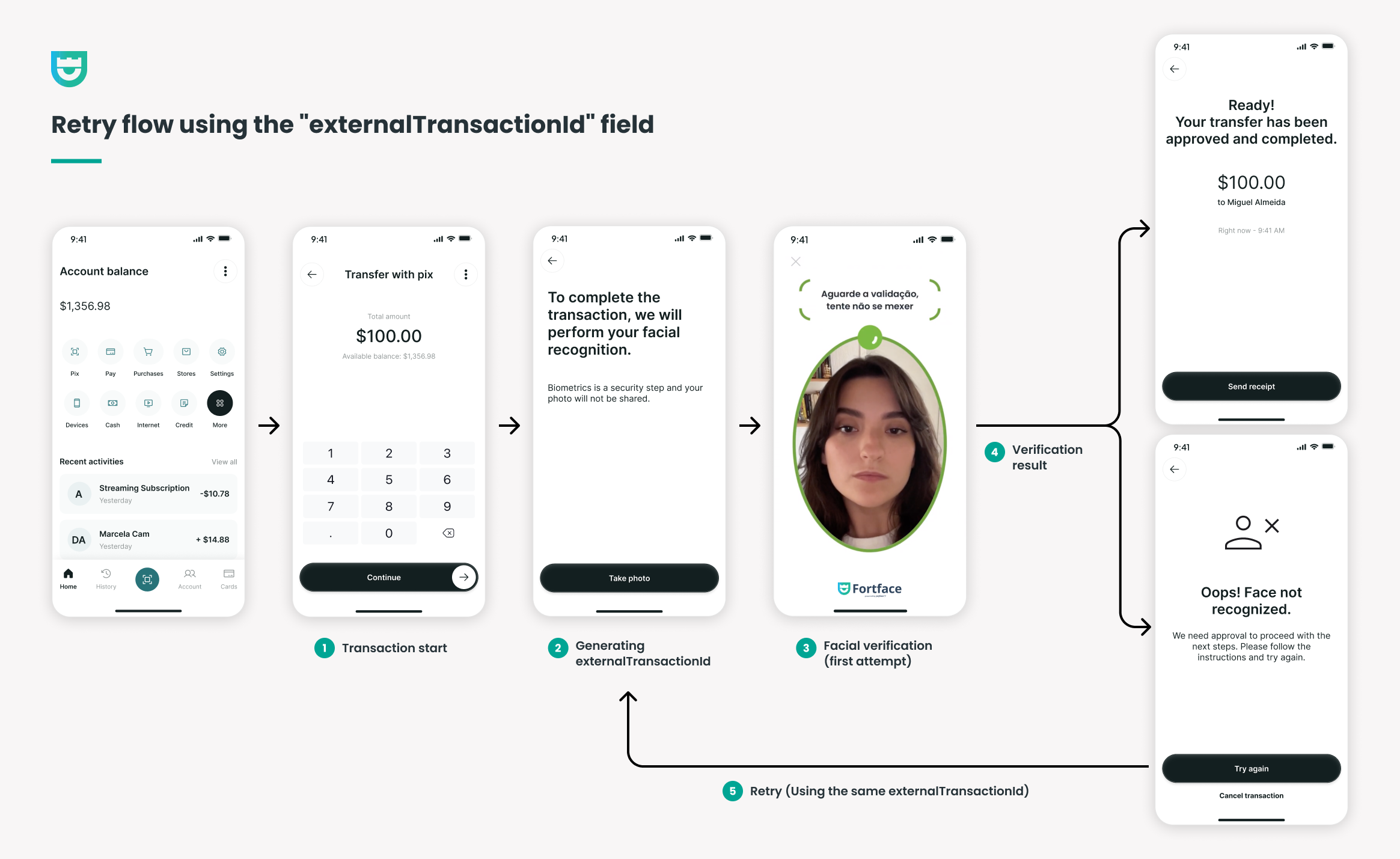
Understanding the Retrial Flow:
1. Transaction Start
- The client initiates a transaction.
2. externalTransactionId Generation
- When attempting to confirm the transaction, the application generates an
externalTransactionId— a unique identifier for this transaction attempt. - Next, the application makes the first request to the Fortface platform, asking for a
sessionIdfor facial verification, using theexternalTransactionIdas a reference.
3. Facial Verification (First Attempt)
- The client is redirected to the biometric verification screen.
- The Fortface SDK is activated, and the client performs the facial recognition.
4. Verification Result
- Success Scenario: If facial recognition is successful, the process is concluded and the transaction is finalized. The client receives a success confirmation.
- Failure Scenario: If recognition fails (e.g., "Face not recognized"), the client is notified of the error and has the option to "Try Again".
5. Retry (Using the Same externalTransactionId)
- When clicking "Try Again," the application does not start a new transaction.
- It makes a new request to Fortface for a
sessionId(a new session for the verification), but this time, it re-uses the sameexternalTransactionIdfrom the first attempt.
What does this mean?
Reusing the externalTransactionId allows the Fortface platform and the client application to group all facial verification attempts under a single transaction event.
- For the client: The experience is seamless, and they don't have to restart the process from scratch.
- For technical support and auditing: It is possible to easily track and analyze all biometric verification attempts for that specific transaction, which facilitates investigation and problem resolution.
Example of a request with externalTransactionId
curl --request POST \ --url https://api-sandbox.fortface.ai/handshake \ --header 'Content-Type: application/json' \ --header 'x-api-key: string' \ --data '{ "galleryId": "string", "accountName": "string", "action": "enroll", "deviceRequestInfo": "string", "externaltransactionid": "string" }'